Download Xiaohongshu Videos on Android
Looking for a Xiaohongshu video downloader Android option that does not force another APK onto your phone? Use the free web tool in Chrome, Samsung Internet, or Firefox — paste a public share link, download on the same page, and keep files in your normal Downloads folder. No Google Play install, no account, and no watermark when the note is public and the link is fresh.
This page is the Android-specific walkthrough for our browser tool. The same engine powers desktop, but phone users care about clipboard paste, Chrome download prompts, and finding the file later in Files. If you only need the paste box, jump straight to the Xiaohongshu Video Downloader homepage; if you want the full Android path, keep reading.
Open the Xiaohongshu Video Downloader →
Why you do not need an Android app
Most “RedNote downloader” APKs ask for broad storage permissions, inject ads, or sit unsigned outside Play Protect. A dedicated app also has to chase Xiaohongshu API changes — when it breaks, you are stuck waiting for an update. Our Xiaohongshu Video Downloader is a website. Chrome already knows how to download MP4 and image files; the site resolves your note and streams media through a allowlisted proxy. You get fewer install risks, no mystery update prompts, and the same flow on Pixel, Samsung, Xiaomi, Oppo, OnePlus, and other Android phones.
If you can open a webpage and long-press to paste, you already have everything required. The phrase people type into Google — xiaohongshu video downloader android — usually means “save this RedNote clip on my phone,” not “install a second social app.” A browser tab is enough: no sideloading, no Chinese app store detours, and you can clear site data anytime without uninstalling anything.
Step-by-step on Android (with screenshots)
Follow these three screens in order. Always use a fresh Copy link from the Xiaohongshu or RedNote app — expired xsec_token values and private notes fail even when the page loads. Pasting the entire share card (title + URL) is fine; our parser extracts the URL for you.
Copy the share link in Xiaohongshu. Open a public note in the Xiaohongshu or RedNote app, tap Share, then Copy link so the full xhslink or explore URL is on your clipboard.
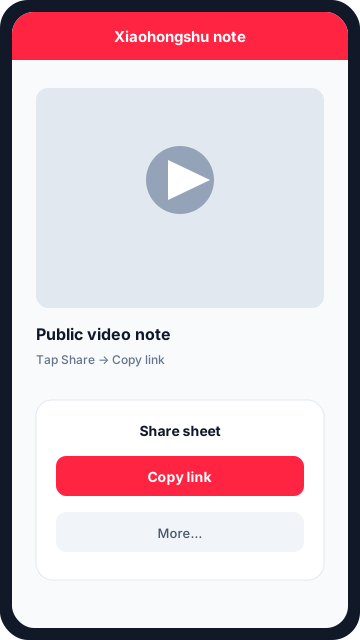
Step 1 — Share the note and tap Copy link in the Xiaohongshu app. Open the web downloader in Chrome. In Chrome (or Samsung Internet), open the Xiaohongshu Video Downloader homepage, paste the link, and tap Download.
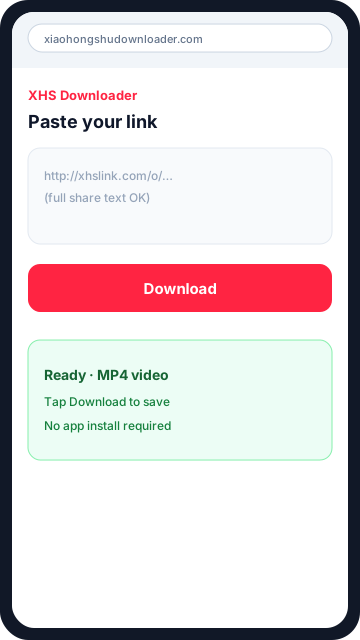
Step 2 — Paste into the Xiaohongshu video downloader Android page in Chrome. Save the file to Downloads. Tap Download on each video or image. Android stores the MP4 or image in your Downloads folder so you can open it from Files or the Chrome notification.
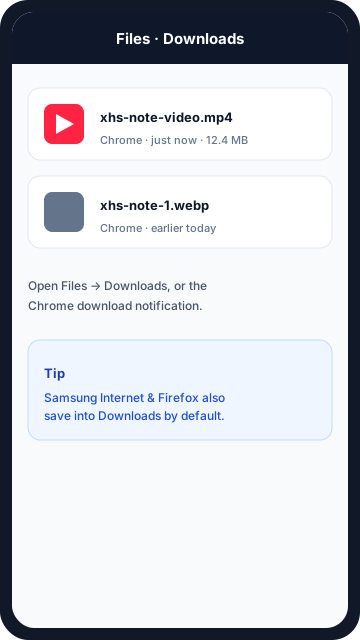
Step 3 — Open Files → Downloads to find your saved MP4 or images.
Prefer a shorter checklist? Start on the homepage tool after you copy the link, or read how to copy a Xiaohongshu link if Share → Copy link looks different on your app build. iPhone users should use the iOS guide instead — Safari’s save sheet behaves differently from Android Downloads.
Where files land in the Downloads folder
After you tap Download on a video card, Android Chrome shows a notification and writes an .mp4 into Files → Downloads (some OEMs label it Download). Image notes save as .webp or .jpg depending on what the CDN returns. Open the file from the notification shade, from Chrome’s Downloads list (⋮ menu → Downloads), or from the system Files app — including dual-storage views if your phone routes browser downloads to an SD card.
Samsung Internet and Firefox follow the same pattern: the browser owns the download, so Gallery / Google Photos may take a moment to index new videos. If you do not see the file, search filenames starting with xhs- or sort Downloads by date. Offline playback works in VLC, the built-in Videos app, or any player that supports MP4/H.264 — you do not need to reopen Xiaohongshu.
Tip: keep the screen awake until the progress bar finishes on large clips. Switching apps mid-transfer can pause Chrome’s download until you return. For image carousels, download each item once; Android lists them as separate files in the same folder. If a download stalls at 0%, check that mobile data or Wi‑Fi is active and that the site is allowed to download files under Chrome site settings.
Troubleshooting on Android
- Parse errors → re-copy the link from the app; do not reuse an old chat message from days ago.
- Empty result → the note may be private, deleted, or region-limited.
- File opens in a tab but will not save → enable downloads for this domain in Chrome, then retry from the downloader homepage.
- Still stuck → confirm you pasted a public note URL (
xhslink.com,rednote.com, orxiaohongshu.com/explore/…), not a profile page.
Start downloading on Android
You now have a complete Xiaohongshu video downloader Android path: copy in the official app, paste in Chrome, save to Downloads — no third-party APK required. When you are ready, use the live tool on the homepage and paste your next share link. Bookmark the site so the next save takes under a minute.